

Cloud email marketing that checks before it sends.
K2Mailer helps small businesses, agencies, and newsletter teams organise subscribers, prepare campaigns, catch problems before they go out, and measure the results — sending through your own provider, with AI assistance on eligible plans.
- No credit card required
- Free Starter plan
- Built and supported by Scriptbaker
One workspace for your list, your campaigns, and your reputation.
K2Mailer is a cloud-based email marketing platform. You import and segment your contacts, build one-off campaigns or automated drip sequences, and send them through a sending server you connect — Amazon SES, Mailgun, SendGrid, SparkPost, SMTP, and others.
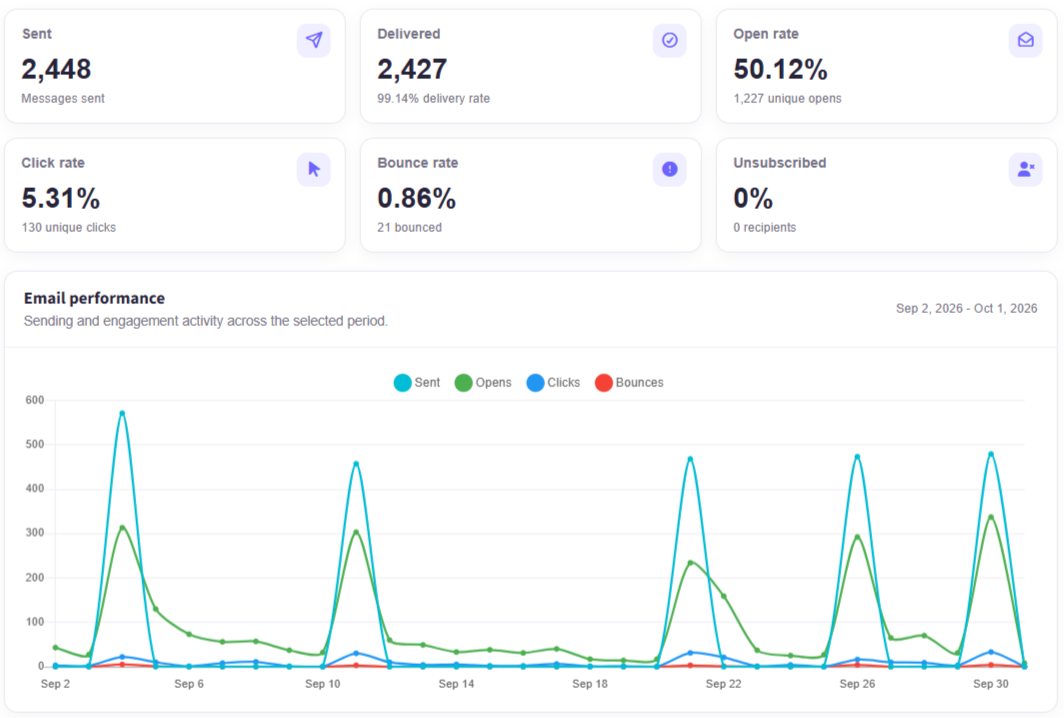
Before anything goes out, a preflight check reviews the campaign, audience, and sending server, and blocks the send if something is wrong. Optional AI review flags content issues and suggests fixes. After sending, reporting shows deliveries, opens, clicks, bounces, and complaints, with exportable statistics.
Built for teams that send email every week.
Newsletter teams
Organise subscribers into lists, keep preferences honoured through the preference center, and send regular updates.
Example taskSchedule this week's issue to every active subscriber, minus anyone who unsubscribed.
Small businesses
Segment customers by behaviour or custom fields and run promotions without a marketing department.
Example taskSend a launch offer only to customers who clicked last month's campaign.
Agencies
Invite staff with role-based permissions, so a campaign manager can build sends without touching billing or sending infrastructure.
Example taskLet a client's marketer draft campaigns while your team controls domains and servers.
Software teams
Connect your application through the REST API, subscription web forms, and event-based triggers.
Example taskAdd new app sign-ups to a list and start an onboarding drip automatically.
Everything you need to run email properly.
One platform for the whole send lifecycle: building your list, preparing the campaign, protecting your reputation, and reading the results.
Campaigns & audience targeting
Send to lists, segments, or individual contacts, with shortcodes to personalise every message.
Read the guideContacts, lists & segments
Import and export contacts with field mapping. Unsubscribe and suppression status is preserved on import.
Read the guideAutomation
Drip sequences, event- and date-based triggers, follow-ups, and split tests.
Read the guidePreflight & test sends
A mandatory preflight check on every campaign, plus test sends to check layout and links in your own inbox.
Read the guideSending controls
Verify sending domains, connect your sending servers, and process bounces and feedback-loop complaints.
Read the guideReporting
Event-level reporting on deliveries, opens, clicks, bounces, and complaints, with exportable statistics.
Read the guideFrom draft to sent in six steps.
Connect your domain
Verify a sending domain with DNS records and connect a sending server, so campaigns go out under your own identity.
Build your list
Import contacts from CSV or collect them with web forms, then organise them into lists and segments.
Draft & review with AI
Write the campaign yourself or start from an AI draft, then run an optional AI review. Nothing is sent without your approval.
Pass the preflight check
K2Mailer checks the campaign, audience, and sending server automatically, and blocks the send if it finds a problem.
Send a test
Send a test to yourself to check how the email looks in your mail client and that every link works.
Schedule & measure
Schedule the send, then track deliveries, opens, clicks, bounces, and complaints as results arrive.
AI review that shows what to fix, and why.
Preflight checks run on every campaign. AI review is an extra, optional step on eligible plans. It reads your draft, lists the issues it finds, and suggests changes. You decide what to accept.
AI review · Example
Subject line
“FREE!!! Last chance to SAVE BIG” uses all caps and repeated punctuation, which can trigger spam filters.
Suggestion: Try: “Last chance: 30% off the spring collection”
Missing preheader
Without a preheader, inboxes show the first line of the body (“View this email in your browser”).
Suggestion: Add: “Ends Sunday — free shipping on every order.”
Image-heavy layout
Most of the message is one image, so readers with images turned off see almost nothing.
Suggestion: Add the offer and CTA as live text above the image.
Unsubscribe link and sender address
Both present and valid.
A separate AI assistant for your website.
The AI Chat Assistant is a separate K2Mailer product, with its own subscription. It is not part of campaign review.
Live in one script tag
Add one line of code to your site and the assistant starts answering visitor questions.
Trained on your content
Train it from uploaded files or your website URLs, so answers come from your own material.
Captures leads for follow-up
After a few messages, it asks the visitor for their email address, so your team can follow up on the conversation.
Running on scriptbaker.com
The chat bubble on this page is the same assistant. Try it now.
Scriptbaker Assistant
Powered by K2Mailer
Hi! Ask me about our services, K2Mailer, or getting started.
Can K2Mailer send through my own Amazon SES account?
Yes. Connect SES (or Mailgun, SendGrid, SMTP, and others) as a sending server, verify your domain, and campaigns go out through your account.
Great. Can someone help me set that up?
Of course. Leave your email and the Scriptbaker team will get in touch to help with setup.
Deliverability tools, under your control.
No platform can guarantee inbox placement. K2Mailer gives you the controls that protect your sender reputation.
Simple plans, free to start.
Try K2Mailer free for 14 days, with no credit card required. Trial limits follow the plan you choose.
Starter
For trying K2Mailer and small lists.
$0/month
- Up to 10,000 emails
- Core campaign tools
- Basic analytics
- Email support
Professional
For teams sending regularly.
$19/month
- Unlimited emails (sent through your own provider)
- Advanced analytics
- Automation tools
- API access
- Priority support
Enterprise
For larger senders and agencies.
Custom
- Custom sending setup
- Security workflows
- Dedicated onboarding
- Team support
Prices shown are K2Mailer platform fees. Your sending provider (for example Amazon SES) bills its own sending charges separately. The website AI Chat Assistant is a separate subscription.
What you need, and how we help.
What you'll need
A domain you control
You'll add a few DNS records so mail is authenticated as coming from you.
A sending provider account
For example Amazon SES, Mailgun, SendGrid, or any SMTP service. K2Mailer sends through it.
Your contacts
A CSV export from your current tool. Unsubscribes and suppressions are preserved on import.
How Scriptbaker can help
Sending-domain setup
We can configure DNS records and connect your provider for you, including moving Amazon SES out of sandbox mode.
Migration
We can move your lists, segments, templates, and unsubscribe history from Mailchimp, Sendinblue/Brevo, or another platform.
Custom integrations
Built-in options include the REST API, web forms, and triggers. For anything else, our engineers can build the integration. Learn more
Read the details.
Questions about K2Mailer
Switching from another email platform?
Start a free trial yourself, or let Scriptbaker set up your sending domain, migrate your lists and unsubscribe history, and connect your app.